VVestiges of New York49,000+ historical photos
MapBrowseAboutGet the iPhone app (opens the App Store)
  1. Browse /
  2. Queens /
  3. This place

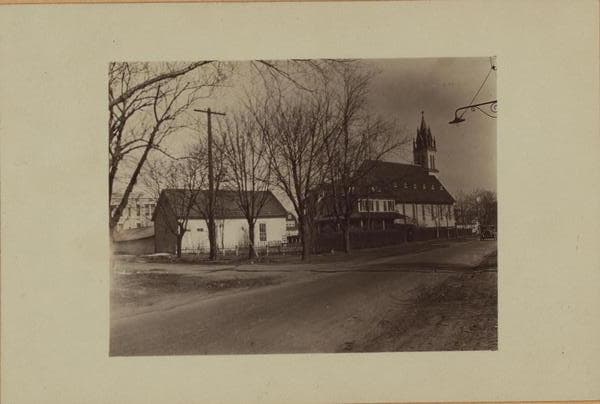
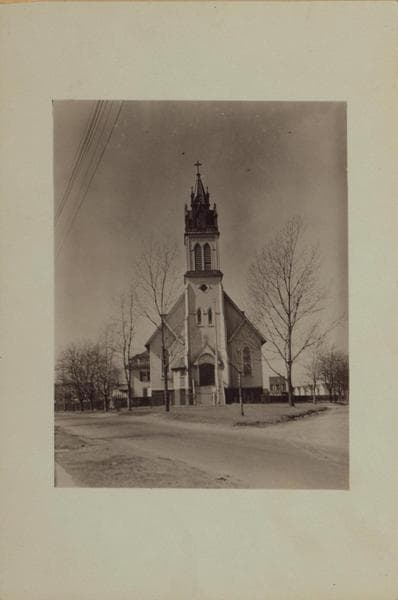
Hollis Avenue & 105th Avenue, Queens

2 historical photos taken here in 1927, oldest first.

See this spot on the map

Photos

  • Queens: Hollis Avenue - 105th Avenue, 1927

    Queens: Hollis Avenue - 105th Avenue

    1927

  • Queens: Hollis Avenue - 105th Avenue, 1927

    Queens: Hollis Avenue - 105th Avenue

    1927

Stand where these photos were taken

The free OldNYC app for iPhone centers the map on you and shows the historical photos taken closest to where you are.
Download on the App Store (opens the App Store)
QR code that opens OldNYC on the App Store

Or scan with your iPhone

Nearby places

  • Springfield Boulevard & 107th Avenue, Queens (2 photos)
  • 104th Avenue & 216th Street, Queens (2 photos)
Explore

  • Map
  • Browse by place
  • Browse by decade

Boroughs

  • Manhattan
  • Brooklyn
  • Queens
  • Bronx
  • Staten Island

About

  • About and contact
  • Privacy

Photos: The New York Public Library, Milstein Collection

OldNYC for iPhone

Find the historical photos taken closest to where you stand.

Download on the App Store (opens the App Store)QR code that opens OldNYC on the App Store
Queens: Hollis Avenue - 105th Avenue, 1927

Photo 2 of 2 at Hollis Avenue & 105th Avenue, Queens

Queens: Hollis Avenue - 105th Avenue

1927

Hollis Avenue (left), north side, at 105th Avenue, showing St. Joachim & Anne Roman Catholic Church. P. L. Sperr March 4, 1927 Views 1, 2

Photo from the New York Public Library - Milstein Collection

See this spot on the mapView on NYPL Digital Collections (opens in a new tab)

See this photo in high resolution

Zoom into the full-resolution scan in the OldNYC app for iPhone with OldNYC Supporter ($4.99). The free app also centers the map on you, so you can find the photos taken closest to where you stand.
Download on the App Store (opens the App Store)
QR code that opens OldNYC on the App Store

Or scan with your iPhone